Presentation Template - Chalk: Design Versatility
Creating a compelling visual narrative often requires balancing aesthetic appeal with functional clarity. For professionals, educators, and creatives, the search for a slide deck that feels both organic and structured can be challenging. Presentation Template - Chalk addresses this specific need by offering a design language rooted in texture and familiarity while maintaining modern corporate utility. Unlike sterile, minimalist templates that can sometimes feel impersonal, this template leverages a chalkboard aesthetic to evoke creativity, learning, and approachability. However, its value extends far beyond its visual theme. It serves as a comprehensive framework for diverse communication needs, ranging from startup pitch decks to educational lectures and personal portfolios.
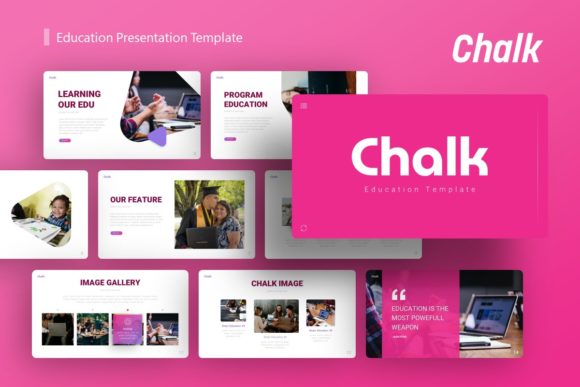
The primary advantage of adopting a specialized template like Chalk is the immediate establishment of tone. In an era where digital fatigue is common, the tactile suggestion of chalk on a board creates a psychological connection with the audience. It signals a space for ideas, brainstorming, and authentic communication. This makes it particularly effective for creative agencies showcasing portfolios, educators introducing complex topics, or startups pitching innovative concepts where storytelling is paramount. The template provides 36 unique slides for each variation, ensuring that users have sufficient layout options to cover extensive content without repetitive design patterns.
Streamlining Workflow Through Master Slide Architecture
Efficiency in presentation design is not merely about speed; it is about consistency and scalability. A significant practical benefit of Presentation Template - Chalk is its foundation on Master Slides. For users who manage large decks or collaborate within teams, this feature is critical. Rather than formatting individual slides manually—a process prone to errors and inconsistencies—changes made at the master level propagate throughout the entire presentation. This ensures that typography, color palettes, and logo placement remain uniform across all 36 slides.
This architectural approach supports long-term usability. If a company rebrands or an educator updates their course branding for a new semester, the transition requires minimal effort. Users can swap colors or fonts globally in seconds rather than hours. Furthermore, the inclusion of drag-and-drop picture placeholders simplifies the integration of custom media. This functionality removes the technical friction often associated with resizing images or adjusting masks, allowing creators to focus on curating content rather than wrestling with alignment tools. The result is a professional-grade deck produced in a fraction of the time required for custom design.
Visualizing Data with Handcrafted Infographics
Data visualization is often the breaking point for many presentations. Standard chart tools can produce accurate graphs, but they frequently lack stylistic cohesion with the rest of the slide deck. Presentation Template - Chalk includes handcrafted infographics specifically designed to match its unique aesthetic. These are not generic stock vectors; they are pixel-perfect illustrations integrated directly into PowerPoint. This distinction matters because it maintains the immersive quality of the presentation even when displaying statistics, timelines, or process flows.
For business professionals and marketers, these editable graphics allow for the clear communication of metrics without breaking the visual theme. Because every graphic element is resizable and editable, users can adapt these infographics to fit specific datasets. Whether illustrating market growth for a pitch deck or explaining a pedagogical framework for a lecture, the visuals remain sharp and stylistically consistent. This capability transforms dry data into engaging visual stories, helping audiences retain information more effectively than through text-heavy slides alone.
Diverse Applications Across Professional Sectors
Versatility is a key consideration when investing in a presentation asset. While the chalk aesthetic suggests education, Presentation Template - Chalk is engineered for a broad spectrum of use cases. Understanding how to leverage this flexibility can maximize the return on investment for different user groups.
- Creative Agencies and Portfolios: The textured background provides a neutral yet interesting canvas for photography and design work. It allows portfolio pieces to stand out without competing against stark white backgrounds, adding a layer of artisanal craftsmanship to the agency’s own brand identity.
- Startups and Pitch Decks: Investors respond to authenticity. The chalk theme can differentiate a startup from competitors using standard corporate blue templates. It suggests a culture of innovation and grassroots problem-solving, which is particularly relevant for ed-tech, arts, or community-focused ventures.
- Corporate Training and Internal Comms: Breaking down silos often requires a less formal tone. Using this template for internal workshops or training sessions can lower barriers to engagement, making employees feel more comfortable participating in discussions and learning initiatives.
- Educators and Academics: Beyond the obvious thematic fit, the layout variety supports different teaching modalities. Slides can be dedicated to discussion prompts, visual case studies, or summary recaps, facilitating a dynamic classroom environment.
It is important to note that while the template is versatile, users should assess whether the informal texture aligns with their specific industry standards. Highly regulated sectors such as finance or law may find the aesthetic too casual for formal reporting, though it could still serve well for internal brainstorming or culture-building presentations.
Technical Specifications and Asset Management
When selecting a digital asset, understanding exactly what is included prevents workflow disruptions. Presentation Template - Chalk delivers a complete package centered around the .PPTX file format, ensuring compatibility with Microsoft PowerPoint, which remains the industry standard for editable presentations. The inclusion of vector icons is a notable practical advantage. Vector graphics scale infinitely without losing resolution, meaning presentations look crisp on everything from laptop screens to large projection displays or 4K monitors.
Users should be aware that the demo images are for preview purposes only and are not included in the downloadable files. This is standard practice in template distribution due to licensing, but it necessitates that users have access to their own high-quality imagery. The provided documentation file serves as a crucial resource, guiding users through customization processes and ensuring they can fully utilize features like master slides and editable graphics. Having clear documentation reduces the learning curve, allowing users to achieve professional results even if they are not advanced PowerPoint users.
Making Informed Design Decisions
Choosing the right template involves weighing aesthetic preferences against functional requirements. Presentation Template - Chalk excels in scenarios where engagement, creativity, and warmth are prioritized over rigid formality. Its strength lies in the combination of artistic flair with robust, editable infrastructure. The 36-slide count offers enough variety to prevent monotony, while the master slide system ensures that this variety does not come at the cost of coherence.
For freelancers and small business owners operating with limited design resources, this template acts as a force multiplier. It provides access to high-end design sensibilities without the expense of hiring a custom designer. For educators, it offers a way to modernize traditional teaching aids, bridging the gap between physical classroom nostalgia and digital presentation technology. Ultimately, the value of this template is realized not just in its initial download, but in the ongoing efficiency and communicative impact it facilitates. By reducing the technical burden of design, it frees up mental energy for what truly matters: crafting a message that resonates, informs, and inspires action.
When implementing this template, consider the contrast ratios required for accessibility. While the chalk-on-dark-background aesthetic is visually striking, users must ensure that text remains legible for all audience members, including those with visual impairments. Testing the presentation in the actual venue or lighting conditions where it will be delivered is always recommended. Additionally, because the graphics are handcrafted, extensive modification of the core illustration style may require vector editing skills outside of PowerPoint. Users should evaluate their comfort level with these tools if they plan to significantly alter the pre-designed infographic elements. Despite these considerations, for those seeking a blend of character and utility, Presentation Template - Chalk offers a sophisticated solution that elevates standard slideshows into memorable visual experiences.