Presentation Template - SuitTie: A Versatile Design Tool
Creating a compelling visual narrative often feels like balancing art with strict business requirements. Whether you are launching a startup, showcasing a photography portfolio, or reporting quarterly earnings, the design of your slides dictates how your message is received. The Presentation Template - SuitTie addresses this challenge by offering a structured yet flexible foundation for modern communicators. It is not merely a collection of pre-designed slides; it is a comprehensive system built to streamline the creation process while maintaining a high standard of professional aesthetics.
At its core, SuitTie serves as a bridge between raw content and polished delivery. For professionals aged twenty to fifty who may not have formal graphic design training, this template removes the intimidation factor of starting from a blank canvas. It provides a cohesive visual language that can be adapted across multiple disciplines. From creative agencies needing a bold pitch deck to corporate entities requiring a clean company profile, the template’s architecture supports diverse storytelling needs without sacrificing brand consistency.
Core Features That Streamline Workflow
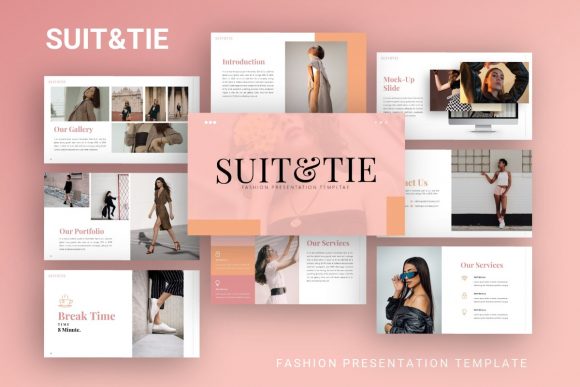
The true value of any digital asset lies in its usability. SuitTie is engineered with practical functionality in mind, ensuring that users spend more time refining their message and less time wrestling with formatting tools. The package includes 35 unique slides for each template variation, providing ample variety to cover complex topics without repetitive layouts. This depth allows for a dynamic flow, preventing audience fatigue during longer presentations.
Customization is handled through an intuitive master slide system. Rather than editing elements individually on every page, users can make global changes to fonts, colors, and logos that propagate instantly throughout the deck. This feature is particularly valuable for teams or individuals managing multiple projects who need to maintain strict brand guidelines. Furthermore, all graphics are fully resizable and editable vectors. This means that whether you are projecting onto a massive conference screen or sharing a PDF via email, the illustrations remain crisp and pixel-perfect at any dimension.
- Master Slide Architecture: Ensures global consistency and rapid rebranding capabilities.
- Vector Graphics: Allows infinite scaling without quality loss for print or digital display.
- Drag-and-Drop Placeholders: Simplifies image insertion, automatically cropping and fitting photos into designated frames.
- Handcrafted Infographics: Transforms complex data into digestible visual formats directly within PowerPoint.
Diverse Applications Across Industries
Versatility is the defining characteristic of the SuitTie ecosystem. While many templates cater to a single niche, this resource is designed to pivot effortlessly between contexts. Understanding where and how to apply these designs can significantly enhance communication effectiveness across different sectors.
Creative Agencies and Portfolios
For freelancers, photographers, and creative directors, the visual presentation is as important as the work itself. SuitTie offers layouts specifically optimized for high-impact imagery. The picture placeholders are designed to respect aspect ratios while creating artistic compositions. A photographer can use these slides to create a digital lookbook, while a graphic designer might utilize the infographic slides to explain their creative process to a client. The clean aesthetic ensures that the template enhances the portfolio rather than competing with it.
Startups and Pitch Decks
Entrepreneurs face the unique challenge of conveying vision, market fit, and financial projections in a limited timeframe. The template includes dedicated structures for pitch decks that guide the narrative flow. Slides designed for team introductions, problem-solution frameworks, and growth metrics help founders organize their thoughts logically. Because the infographics are native to PowerPoint, startups can update their traction charts right before a meeting without needing external design software.
Corporate and Business Profiles
In established business environments, clarity and professionalism are paramount. SuitTie supports company profiles that require a balance of text and data. The handcrafted infographics allow departments to visualize KPIs, organizational structures, or project timelines effectively. Unlike generic corporate templates that often feel sterile, SuitTie introduces subtle stylistic elements that keep stakeholders engaged while maintaining the gravitas required for board meetings or investor updates.
Practical Considerations Before You Begin
While the Presentation Template - SuitTie is designed for ease of use, maximizing its potential requires some preparation. Prospective users should understand exactly what is included in the package to set appropriate expectations and ensure a smooth workflow.
The download includes the primary PowerPoint .PPTX file, a documentation file, and a vector icon set. The documentation is an essential resource, especially for beginners or those unfamiliar with master slide editing. It provides guidance on how to manipulate the template’s advanced features without breaking the layout. Additionally, the included vector icons offer a consistent stylistic library, eliminating the need to hunt for mismatched graphics online.
Important Note on Imagery: Users must be aware that all images shown in the demo preview are for illustrative purposes only and are not included in the downloadable files. This is a standard practice in digital design assets to avoid copyright issues. You will need to supply your own photography and visuals. Fortunately, the drag-and-drop placeholders make swapping in your own content a seamless process. Simply click the placeholder icon, select your image, and the template handles the masking and positioning automatically.
Why Visual Consistency Matters
Beyond the technical specifications, choosing a robust template like SuitTie is an investment in personal or organizational branding. Inconsistent slide designs can subconsciously signal disorganization or lack of attention to detail. By utilizing a unified system based on master slides, presenters project competence and reliability.
For educators and trainers, this consistency aids learning. When students or trainees are not distracted by shifting fonts or chaotic layouts, they can focus entirely on the educational content. For marketers, a cohesive deck reinforces brand recall. Every slide becomes a touchpoint that strengthens the overall identity. The pixel-perfect nature of the illustrations ensures that even when presenting remotely via video conferencing tools, the visual fidelity remains high, preserving the professional impact of the material.
Making the Most of Your Files
To get the best results, approach the template as a toolkit rather than a rigid rulebook. Start by reviewing the documentation to understand the hierarchy of the master slides. Experiment with the color palette early in the process to align it with your specific brand guidelines before populating content. Utilize the 35 slides selectively; there is no obligation to use every layout. Choose the ones that best serve your specific narrative arc.
Remember that the handcrafted infographics are fully editable shapes, not static pictures. You can change colors, adjust sizes, and modify text to reflect your actual data accurately. This flexibility transforms the template from a static design into a living document that evolves with your business or personal brand. Whether you are a hobbyist documenting a passion project or a CEO outlining a five-year strategy, SuitTie provides the structural integrity needed to communicate with confidence and style.