Presentation Template - Wellness: A Practical Guide to Effective Design
When communicating concepts related to health, mindfulness, corporate well-being, or holistic lifestyle brands, the visual tone of your slide deck matters just as much as the data you present. The Presentation Template - Wellness is designed specifically to bridge the gap between professional corporate structure and the softer, more organic aesthetic required for wellness topics. Whether you are a creative agency pitching a new spa concept, a startup founder seeking funding for a health-tech app, or an educator teaching nutrition, this template provides a foundational framework that saves time while maintaining high design standards.
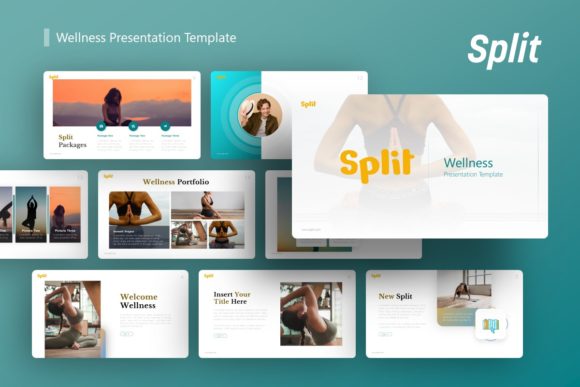
However, owning a high-quality template does not automatically guarantee a successful presentation. Many professionals download assets like the Introducing Split Wellness Presentation only to find themselves frustrated by formatting issues, inconsistent branding, or a final product that looks generic. Understanding how to properly leverage these tools is essential for maximizing your return on investment and ensuring your message resonates with your audience without technical distractions.
Common Misunderstandings About Template Customization
One of the most frequent mistakes users make when adopting a pre-designed deck is treating it as a rigid container rather than a flexible system. The Presentation Template - Wellness includes 36 slides for each variation, which can be overwhelming if approached incorrectly. Beginners often feel compelled to use every single slide or force their content into layouts that do not fit their narrative. This leads to cluttered slides and diluted messaging.
A better approach is to view the 36 slides as a modular library. You should select only the layouts that support your specific story arc. For example, if you are creating a pitch deck for a yoga studio, you might prioritize the image-heavy portfolio slides and the team introduction layouts while skipping the complex data charts intended for corporate annual reports. Efficiency comes from curation, not utilization. By being selective, you maintain visual consistency and keep your audience focused on what truly matters.
The Master Slide Trap
Another critical error involves ignoring the Master Slide architecture. Many users attempt to change fonts, colors, or logo placements on individual slides one by one. This is inefficient and often results in subtle inconsistencies that undermine professional credibility. Because this template is based on Master Slides, global changes should always be made at the master level first.
If you need to adjust the primary color palette to match your brand guidelines, navigate to View > Slide Master in PowerPoint. Making edits here ensures that all handcrafted infographics, headers, and footers update simultaneously across the entire deck. Failing to understand this hierarchy is the primary reason presentations end up looking disjointed. Taking five minutes to learn the master structure will save hours of manual reformatting later and ensure pixel-perfect consistency throughout your delivery.
Evaluating Visual Assets and Licensing Realities
Before purchasing or downloading any design asset, it is vital to manage expectations regarding included media. A common source of disappointment stems from the assumption that the beautiful photography seen in the preview is part of the downloadable file. It is important to note that all images in the demo for the Presentation Template - Wellness are for preview purposes only and are not actually included in the files.
This distinction significantly affects your workflow and budget. If you rely entirely on the demo images to visualize your final product, you may face a jarring reality check upon opening the .PPTX file. To avoid this, audit your own media library before starting. Ensure you have high-resolution, royalty-free images that match the serene and clean aesthetic of the template. Using low-quality or overly saturated stock photos can clash with the handcrafted illustrations and pixel-perfect vector icons provided. Planning your imagery strategy beforehand prevents the design from feeling like two mismatched halves.
Vector Graphics vs. Raster Limitations
The template features resizable and editable graphics, but users often misunderstand the difference between vector elements and raster placeholders. While the infographic elements and icons are vectors that can be scaled infinitely without quality loss, picture placeholders operate differently. Dragging and dropping a small, compressed JPEG into a full-bleed placeholder will result in pixelation, regardless of the template’s quality.
Always verify the resolution of your inserted photos. The template provides the structure, but you must provide the fidelity. Additionally, when editing the handcrafted infographics, ensure you are ungrouping elements correctly within PowerPoint. Some complex shapes may require specific editing techniques to modify without breaking the alignment. Reading the included Documentation File is not optional; it contains specific instructions for manipulating these custom vector assets that standard PowerPoint tutorials will not cover.
Strategic Application Across Different Industries
Versatility is a key selling point, but it requires intentional adaptation. The Presentation Template - Wellness is marketed for diverse uses including Creative Agency, Company Profile, Corporate and Business, Portfolio, Photography, Pitch Deck, Startup, and Personal Portfolio. A mistake occurs when users apply a "one-size-fits-all" mindset to these distinct categories.
For instance, a Personal Portfolio requires a different pacing and layout density than a Corporate Pitch Deck. In a portfolio, whitespace and large typography allow the work to breathe. In a pitch deck, information density and clear data visualization take precedence. Do not simply swap text and expect the template to adapt its rhetorical function automatically. You must actively choose slide variations that align with your objective.
- For Startups: Focus on the problem/solution slides and market size infographics. Keep aesthetic flourishes minimal to maintain investor focus on viability.
- For Creative Agencies: Utilize the grid-based portfolio layouts and mood board slides. Here, the template serves as a frame for your creativity, not the star of the show.
- For Corporate Wellness Programs: Leverage the timeline and process diagrams to explain program rollout. Clarity and accessibility should override artistic abstraction.
Technical Checks Before Finalizing Your Decision
Before committing to this template, perform a practical compatibility check. While the .PPTX format is industry-standard, certain advanced animations or font renderings can behave differently across software versions. If you are using an older version of PowerPoint or Keynote, test the file immediately after download. Verify that the handcrafted infographics remain editable and that the master slide links are intact.
Additionally, consider your output destination. If you plan to present via Zoom or Teams, test how the color palette translates on screen. Wellness templates often utilize soft pastels or low-contrast earth tones that look elegant in print but may wash out on poorly calibrated monitors. Increasing contrast slightly for digital presentations is a proactive correction that improves accessibility and readability. Always prioritize communication clarity over strict adherence to the original design if technical constraints demand it.
Ultimately, the Presentation Template - Wellness is a powerful tool for professionals who value both aesthetics and efficiency. By avoiding common pitfalls regarding master slides, image licensing, and contextual application, you transform a generic download into a bespoke communication asset. Success lies not in the template itself, but in the thoughtful, informed way you wield it to tell your unique story.