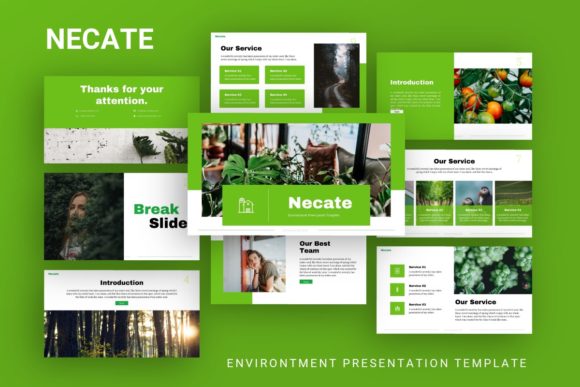
Evaluating Presentation Template - Necate for Professional and Creative Projects
Selecting the right visual framework for a presentation often dictates the success of the communication itself. For professionals navigating between corporate reporting and creative pitching, the Presentation Template - Necate offers a hybrid solution designed to bridge the gap between rigid business structures and fluid artistic expression. Unlike generic slide decks that force content into predetermined boxes, Necate is engineered with a Master Slide architecture that prioritizes editability without sacrificing design integrity. Understanding where this template fits within the broader ecosystem of presentation resources requires looking beyond surface-level aesthetics to evaluate its technical flexibility, intended use cases, and practical limitations compared to alternative formats.
Defining the Necate Design Philosophy
At its core, Presentation Template - Necate distinguishes itself through a dual-purpose design language. Many templates on the market are categorized strictly as either "corporate" or "creative," forcing users to choose between data readability and visual impact. Necate attempts to merge these categories by providing 35 distinct slides per template variant that utilize handcrafted infographics alongside clean typography. This approach is particularly relevant for users who need to present complex data in a visually engaging manner, such as startups seeking funding or agencies showcasing portfolio work.
The distinction lies in the construction method. Rather than relying on static images for charts and graphs, Necate utilizes native PowerPoint shapes and vector-based illustrations. This means that every infographic is fully resizable and editable directly within the software. For a researcher or business analyst, this eliminates the common friction point of having to recreate charts in Excel and paste them as uneditable pictures. The pixel-perfect illustrations maintain clarity at any resolution, which is a critical factor when presenting on large screens or exporting to high-resolution PDF formats for distribution.
Technical Flexibility Versus Pre-Built Alternatives
When comparing Necate to other premium presentation resources, the primary differentiator is the reliance on Master Slides. In many lower-tier or free alternatives, design elements are often locked on individual slides. Changing a color scheme or logo placement requires editing dozens of slides individually. Necate’s adherence to Master Slide logic allows for global changes across the entire deck instantly. This architectural choice significantly reduces the time required for rebranding or adapting the template for different clients.
However, this flexibility comes with a learning curve. Users accustomed to simple drag-and-drop builders or web-based presentation tools may find the Master Slide environment initially restrictive. While web-based tools offer ease of use, they often lack the granular control over vector graphics and offline accessibility that a .PPTX file provides. Necate is best suited for users who possess intermediate proficiency in PowerPoint and value long-term asset ownership over quick, browser-based convenience. If your workflow demands rapid collaboration in real-time with non-designers, a cloud-native alternative might be superior. Conversely, if you require a polished, offline-capable asset that adheres to strict brand guidelines, Necate’s file structure offers greater stability.
Assessing Fit Across Different Use Cases
The versatility of Presentation Template - Necate makes it applicable to several distinct scenarios, but it performs differently in each. Evaluating its effectiveness requires matching specific features to user needs.
- Creative Agencies and Portfolios: The template includes dedicated layouts for photography and visual portfolios. The picture placeholders are designed for easy drag-and-drop functionality, allowing creatives to swap imagery without breaking the layout grid. Compared to specialized portfolio builders, Necate offers more narrative control, allowing designers to combine visual work with detailed case study text in a single document.
- Corporate and Business Profiles: For company profiles, the handcrafted infographics serve as a major advantage. Standard corporate templates often rely on generic stock vectors. Necate’s custom illustrations provide a unique visual identity that can help a business stand out in saturated markets. However, organizations with extremely dense data sets should verify that the included chart styles accommodate their specific metrics before purchasing.
- Startups and Pitch Decks: Investors often review dozens of decks weekly. Necate provides structured flows typical of successful pitch decks, including problem/solution slides, market analysis, and team introductions. The balance of whitespace and content density helps prevent information overload. Unlike minimalist startup templates that sometimes lack substance, Necate retains enough structural weight to convey professionalism and maturity.
- Personal Branding: For freelancers and consultants, the template serves as a digital business card. The ability to customize colors and fonts ensures alignment with personal branding assets. It offers a more cohesive experience than mixing disparate free slides found online.
Tradeoffs and Decision Factors
No template is universally perfect, and Presentation Template - Necate has specific tradeoffs that must be weighed against its benefits. One significant consideration is the volume of content. With 35 slides per template, users have ample variety, but this abundance can lead to decision paralysis or scope creep. In contrast, minimalist templates with only 10-15 slides force editors to be concise. Users must exercise discipline to select only the slides that serve their narrative rather than feeling compelled to use all available options.
Another factor is the dependency on Microsoft PowerPoint. While the .PPTX format is an industry standard, compatibility issues can arise when opening complex master-slided files in alternative software like Keynote, Google Slides, or LibreOffice. Animations, transitions, and specific font renderings may not translate perfectly outside the native ecosystem. If your audience or team operates exclusively in non-Microsoft environments, testing the file beforehand is essential. Web-based alternatives eliminate this compatibility risk but sacrifice the advanced vector editing capabilities that define Necate’s value proposition.
Furthermore, while the template includes vector icons and documentation, it does not include the preview images. This is standard practice for digital assets, but it places the burden of sourcing high-quality photography entirely on the user. The visual impact of the final presentation will depend heavily on the quality of the images inserted. A template cannot compensate for poor source material. Users without access to professional photography or premium stock libraries may find the final result less impressive than the demo suggests.
When to Choose Necate Over Other Options
Determining whether Presentation Template - Necate is the correct investment involves analyzing your current resource gaps. This template is likely the right choice if you identify with the following criteria:
- You need a unified system: You are tired of piecing together slides from different sources and want a consistent visual language across all communications.
- Data visualization is key: Your presentation relies on explaining processes, statistics, or timelines, and you need custom graphics rather than standard bullet points.
- You require offline reliability: You frequently present in venues with uncertain internet connectivity and cannot rely on cloud-based tools.
- Brand consistency is mandatory: You need to apply specific corporate colors and fonts globally without manual adjustment on every slide.
Conversely, you should explore alternatives if:
- Speed is the only metric: You need to generate a basic update in under 30 minutes and do not care about custom branding.
- Collaboration is paramount: Multiple stakeholders need to edit the file simultaneously in real-time.
- You lack PowerPoint skills: You are uncomfortable navigating Slide Master views or manipulating vector nodes.
- Your content is purely textual: You are delivering a lecture or report that requires minimal visual support; a simpler, text-focused theme would be less distracting.
Maximizing Value Through Proper Implementation
To derive the full benefit from Presentation Template - Necate, users should approach it as a design system rather than a collection of pretty pages. Start by reviewing the included documentation file to understand the hierarchy of the Master Slides. Set up your color palette and typography before adding any content. This upfront configuration ensures that every subsequent slide added to the deck automatically inherits the correct styling.
Utilize the picture placeholders correctly. Dragging and dropping images into designated frames maintains the aspect ratio and alignment intended by the designer. Manually resizing images outside these frames often breaks the visual rhythm. Additionally, leverage the included vector icon set to create custom diagrams. Combining these icons with the handcrafted infographics allows for bespoke visuals that feel tailored to your specific message, rather than generic template filler.
Finally, consider the longevity of the asset. Because Necate is built on fundamental PowerPoint features rather than trendy effects, it is less likely to look dated in two or three years. Investing time in mastering this template creates a reusable asset library. Over time, the efficiency gained from having a pre-configured, professional-grade foundation outweighs the initial setup effort. When evaluating presentation resources, always calculate the total cost of ownership—including time spent fixing formatting errors—rather than just the upfront price. Necate positions itself as a productivity tool for serious presenters who view their slides as strategic assets rather than disposable containers.