Evaluating the Socian Business Presentation Template for Professional and Creative Needs
Selecting the right visual framework for a business presentation often involves balancing aesthetic appeal with functional adaptability. The Socian Business Presentation Template has emerged as a notable option for professionals seeking a versatile design system that bridges the gap between corporate formality and creative agency flair. Unlike single-purpose templates designed exclusively for pitch decks or annual reports, Socian is structured to accommodate a wide spectrum of use cases, including company profiles, photography portfolios, startup introductions, and personal branding. Understanding its specific architecture, feature set, and limitations is essential for determining whether it aligns with your current project requirements or if an alternative solution would be more appropriate.
Core Architecture and Customization Capabilities
The primary value proposition of the Socian Business Presentation Template lies in its technical foundation rather than just its surface-level design. The template includes 36 unique slides per variation, providing a substantial library of layouts without becoming unmanageable. For users comparing this against minimalist templates that may offer only 15–20 slides, or comprehensive suites with over 100 slides that suffer from bloat, Socian occupies a practical middle ground. This volume allows for narrative depth in pitch decks and company profiles while remaining concise enough for shorter portfolio reviews.
A critical differentiator is the reliance on Master Slides for global changes. Many lower-tier presentation resources require manual formatting adjustments on individual slides, which introduces inconsistency and consumes significant time during revisions. Socian’s master slide architecture ensures that font changes, color palette updates, and logo placements propagate instantly across the entire deck. This feature is particularly valuable for agencies managing multiple client brands or corporate teams adhering to strict brand guidelines. When evaluating this template, verify that your team possesses intermediate PowerPoint proficiency; while the system is powerful, maximizing the efficiency of master slides requires understanding parent-child slide relationships.
The inclusion of handcrafted infographics distinguishes Socian from templates that rely on generic SmartArt or static imagery. These vector-based graphics are fully resizable and editable within PowerPoint, meaning they maintain crispness at any display resolution. For data-heavy presentations, such as quarterly business reviews or market research summaries, this capability reduces the need to export charts from external software like Illustrator or Excel, streamlining the workflow. However, users should note that while the graphics are editable, they are pre-designed structures. If your data visualization needs are highly non-standard or require real-time data linking, a dedicated BI tool integration might still be necessary alongside this template.
Visual Assets and File Management
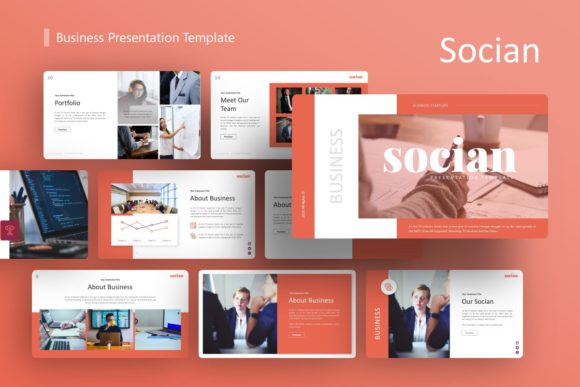
Socian provides pixel-perfect illustrations and vector icons directly within the package. This consolidation of assets eliminates the licensing ambiguity often associated with downloading free icons or purchasing separate illustration packs. The picture placeholder system utilizes drag-and-drop functionality, significantly reducing the friction involved in swapping demo content for actual project assets. It is imperative to understand, however, that all images shown in the preview are for demonstration purposes only and are not included in the downloadable files. This is standard industry practice, but it necessitates budgeting time and resources for sourcing high-quality photography that matches the template’s clean, modern aesthetic. Using low-resolution or stylistically mismatched stock photos can undermine the professional polish the template is designed to provide.
Comparative Fit Across Different Use Cases
Versatility is Socian’s stated strength, but practical application varies by context. Comparing its performance across different categories helps clarify where it excels and where compromises may exist.
- Creative Agencies and Portfolios: Socian performs exceptionally well here due to its emphasis on visual hierarchy and whitespace. The layout options support image-heavy storytelling better than traditional corporate templates. Compared to specialized portfolio templates, Socian offers more text-friendly layouts, making it suitable for agencies that need to balance case study visuals with detailed service descriptions and team bios.
- Corporate and Company Profiles: For established businesses, the template provides sufficient structure for organizational charts, timelines, and mission statements. It avoids the overly playful aesthetics of some creative templates while remaining less sterile than legacy corporate designs. However, organizations requiring complex financial modeling tables or dense regulatory compliance slides may find the 36-slide count limiting compared to enterprise-grade annual report templates.
- Startups and Pitch Decks: The template includes essential pitch elements like problem/solution slides, market sizing, and team introductions. Its clean design helps maintain investor focus on content rather than decoration. When compared to niche pitch deck templates, Socian may lack specific fundraising-focused frameworks (such as detailed cap table layouts or traction metric dashboards), but it offers greater longevity for post-funding operational presentations.
- Personal Portfolios: Individuals benefit from the template’s modular nature, allowing freelancers to create tailored decks for different client pitches without redesigning from scratch. The tradeoff is that personal portfolio templates often include more personality-driven or experimental layouts, whereas Socian maintains a safer, more universally professional tone.
Tradeoffs and Decision Factors
No template is universally optimal, and Socian presents specific tradeoffs that must be weighed against alternatives. One consideration is the learning curve associated with its customization depth. While marketed as easy to customize, the handcrafted infographics and master slide dependencies mean that novice users cannot simply delete elements without potentially breaking layout integrity. Teams without designated designers or advanced PowerPoint users may experience initial friction. In contrast, simpler templates with basic shapes and standard text boxes offer faster setup times for urgent, low-stakes presentations.
Another factor is stylistic neutrality. Socian’s design is intentionally adaptable, which means it lacks strong thematic identity out-of-the-box. This is advantageous for multi-brand agencies but may feel generic for organizations with bold, distinctive brand personalities. Achieving a unique look requires intentional customization of colors, typography, and imagery. If your priority is immediate visual impact with minimal editing, a theme-specific template aligned with your industry aesthetic might deliver faster results, albeit with reduced long-term flexibility.
File format compatibility also warrants attention. Socian is delivered as a .PPTX file optimized for Microsoft PowerPoint. Users operating primarily in Keynote, Google Slides, or web-based platforms should test compatibility before purchase. While conversion is usually possible, complex master slides, custom infographics, and specific animations may not translate perfectly across ecosystems. Native platform templates, though often less feature-rich, guarantee full functionality and avoid conversion artifacts.
When to Choose Alternatives
Despite its strengths, there are scenarios where Socian may not be the optimal choice. Organizations requiring extensive data visualization beyond standard infographics should consider templates integrated with Excel or dedicated data viz tools. Presentations demanding video backgrounds, complex motion graphics, or interactive elements may exceed Socian’s static design focus and require multimedia-specialized templates or video editing software. Additionally, users needing print-optimized layouts for brochures or reports alongside digital slides should verify aspect ratio and bleed settings, as presentation templates are typically screen-optimized and may require significant adjustment for professional printing.
Conversely, Socian represents a strong investment for users who anticipate diverse presentation needs over time. Its combination of 36 thoughtfully designed slides, robust master slide architecture, and integrated vector assets provides a sustainable design system rather than a disposable one-time solution. For professionals valuing consistency, editability, and cross-context applicability over niche specialization, it offers a balanced foundation that supports both immediate delivery and long-term brand coherence. The decision ultimately hinges on whether your priority is rapid deployment for a single purpose or building a flexible presentation infrastructure capable of evolving with varied communication challenges.
Evaluating presentation resources requires honest assessment of both capabilities and constraints. Socian Business Presentation Template delivers genuine utility through its structural design and asset integration, but realizing that value depends on matching its features to realistic workflow expectations. By considering your team’s technical proficiency, brand requirements, and anticipated use case diversity, you can determine whether this template serves as an appropriate foundation or whether alternative solutions better address your specific presentation objectives.