Travate Travelling Presentation Template Guide
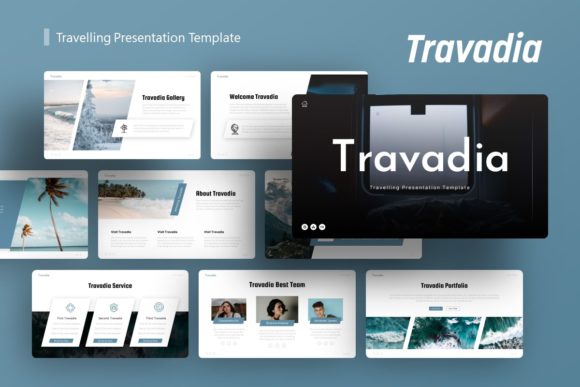
Creating a visually compelling narrative for travel-related content requires more than just beautiful photographs; it demands a structured layout that guides the viewer through an experience. The Travate Travelling Presentation Template serves as a comprehensive design framework specifically engineered to bridge the gap between raw visual assets and professional storytelling. Whether you are pitching a new tourism startup, showcasing a photography portfolio, or presenting corporate travel data, this template provides the architectural foundation necessary to communicate ideas effectively without spending dozens of hours on graphic design.
In an era where digital attention spans are short, the aesthetic quality of your slide deck directly influences how your message is received. Travate addresses this by offering a pixel-perfect environment where content takes precedence over decoration. It eliminates the friction often associated with building presentations from scratch, allowing professionals and creatives to focus entirely on refining their message rather than wrestling with alignment tools and color palettes.
Core Design Architecture and Customization
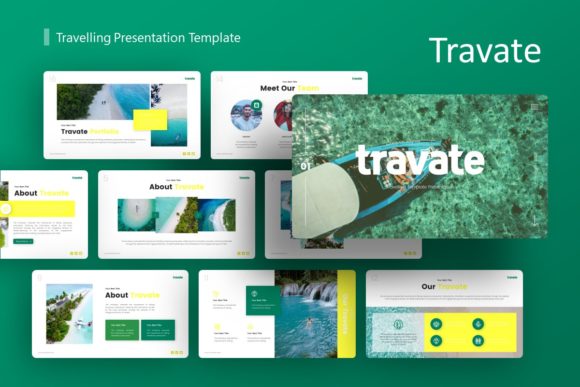
The primary strength of the Travate Travelling Presentation Template lies in its technical flexibility combined with artistic cohesion. Each package includes 36 unique slides, providing a substantial library of layouts that cover everything from title screens and team introductions to data visualization and image galleries. This volume ensures that users rarely need to create a custom slide from zero, maintaining visual consistency throughout the entire deck.
Customization is built upon a Master Slide system within PowerPoint. For those unfamiliar with advanced presentation design, Master Slides act as the global stylesheet for your deck. When you adjust a font, color scheme, or logo placement on the Master Slide, those changes propagate instantly across all relevant slides. This feature is critical for maintaining brand integrity, especially when multiple team members are collaborating on a single file. It prevents the common issue of "slide drift," where individual pages begin to look disjointed due to manual formatting errors.
Furthermore, the template includes handcrafted infographics that are fully editable vector objects. Unlike static images imported from external software, these graphics live natively within PowerPoint. You can change colors, resize elements, and modify text without any loss of quality or pixelation. This capability transforms complex travel statistics, itineraries, or market research into digestible visual formats that enhance audience retention.
Versatile Applications Across Industries
While the naming convention suggests a niche focus on travel, the structural design of Travate makes it remarkably adaptable for various professional sectors. The clean lines and emphasis on imagery allow it to function effectively in contexts far beyond tourism boards or travel agencies.
Creative Agencies and Portfolios
For photographers, designers, and creative directors, the template acts as a digital canvas. The picture placeholders utilize drag-and-drop functionality, making it effortless to swap demo images with personal work. Because the layouts prioritize negative space and typography, the artwork remains the focal point. A freelance photographer could use this to present a wedding portfolio to prospective clients, while a design agency might adapt the grid layouts to showcase branding case studies. The minimalist aesthetic ensures that the presentation enhances the work rather than competing with it.
Corporate Business and Pitch Decks
Startups and established corporations often struggle to make business presentations feel human and engaging. Travate offers a warmer alternative to sterile corporate templates. A travel tech startup raising capital can utilize the pitch deck specific slides to outline market problems, solutions, and financial projections with a modern, approachable vibe. Similarly, HR departments can repurpose the template for internal culture decks or employee onboarding, using the vibrant layouts to boost engagement during training sessions.
Educational and Non-Profit Storytelling
Educators and non-profit organizations frequently need to convey narratives about geography, culture, or humanitarian efforts. The infographic capabilities allow for clear communication of impact metrics or historical timelines. By using a professionally designed template, these organizations can elevate their perceived credibility when presenting to donors, boards, or students, ensuring that important stories are told with the dignity and polish they deserve.
Enhancing Communication Efficiency and Brand Consistency
Time is often the most scarce resource for professionals. Building a high-quality presentation from a blank slate can easily consume 10 to 20 hours of design time. Utilizing the Travate Travelling Presentation Template compresses this timeline significantly. With pre-designed structures and editable vectors, a polished first draft can be assembled in a fraction of the time. This efficiency allows presenters to allocate more energy toward rehearsing, refining their script, and gathering accurate data.
Beyond speed, the template enforces a level of design discipline that benefits non-designers. Amateur presentations often suffer from inconsistent margins, clashing fonts, and poor contrast ratios. Travate’s pre-set styles act as guardrails, ensuring that every slide meets professional accessibility and aesthetic standards. This consistency builds trust with the audience; when a deck looks cohesive, the speaker appears more organized and authoritative.
The inclusion of vector icons also streamlines the workflow. Instead of hunting for matching icon packs online and worrying about licensing or style mismatches, users have immediate access to a curated set that aligns perfectly with the template’s visual language. This reduces cognitive load during the creation process and results in a more unified final product.
Practical Considerations for Implementation
Before integrating this template into your workflow, there are several practical factors to evaluate to ensure it meets your specific needs. Understanding the file structure and licensing terms will prevent frustration down the line.
- Image Licensing Awareness: It is vital to remember that all images shown in the preview demos are for display purposes only and are not included in the downloadable files. Users must source their own high-resolution photography. Budgeting time and resources for stock photo subscriptions or original photography is a necessary step in the implementation process.
- Software Compatibility: While the .PPTX format is industry-standard, some advanced features like specific transitions or vector editing may behave differently across PowerPoint versions or when opened in Keynote or Google Slides. Always test the master slides and infographics in your primary presentation software before committing to a major project.
- Content Volume Assessment: With 36 slides available, there is a temptation to use them all. However, effective presentations are usually concise. Audit the available layouts and select only those that serve your narrative arc. Deleting unused slides early helps keep the file size manageable and the editing interface uncluttered.
- Documentation Review: The included documentation file is an underutilized asset. It typically contains shortcuts, font links, and troubleshooting tips specific to the template. Reading this guide before starting can save hours of trial-and-error learning regarding how the master slides interact with individual content slides.
Evaluating Value for Professional Growth
Investing in a premium template like Travate should be viewed through the lens of return on investment. For freelancers and agencies, the ability to deliver higher-quality proposals and portfolios faster directly correlates to winning more contracts. For corporate teams, better internal communications lead to clearer alignment and fewer misunderstandings.
The template also serves as an educational tool for aspiring designers and marketers. By deconstructing how the master slides are built, observing the hierarchy of information, and analyzing the use of white space, users can improve their own design literacy. It provides a tangible example of professional layout principles applied to real-world scenarios.
Ultimately, the Travate Travelling Presentation Template is more than a collection of pretty slides; it is a productivity system wrapped in a versatile aesthetic. It respects the user's time while elevating their output, making it a practical choice for anyone who understands that in professional communication, how you present your ideas is just as important as the ideas themselves. Whether for a personal portfolio update or a high-stakes investor meeting, having a reliable, customizable design foundation allows your expertise to shine without distraction.