Negotium Business Presentation Template Guide
Creating a compelling visual narrative often requires more than just good data; it demands a structured design framework that communicates professionalism instantly. The Negotium Business Presentation Template serves as this foundational tool for professionals who need to bridge the gap between raw information and persuasive storytelling. Rather than starting from a blank slide, which often leads to inconsistent formatting and wasted hours, this template provides a pre-architected environment specifically designed for versatility. Whether you are preparing a high-stakes pitch deck for investors or curating a personal portfolio for potential clients, the underlying structure of Negotium allows you to focus on refining your message rather than wrestling with alignment tools and color palettes.
Versatility Across Professional Disciplines
One of the primary challenges in selecting presentation assets is finding a solution that does not pigeonhole you into a single industry aesthetic. Negotium distinguishes itself through genuine adaptability across diverse sectors. For creative agencies and photographers, the template offers layouts that prioritize visual hierarchy and negative space, ensuring that imagery remains the focal point without being cluttered by excessive text boxes. Conversely, corporate entities and startups utilizing the template for company profiles or business updates will find data-driven slides that maintain a clean, authoritative look.
This duality is particularly valuable for freelancers and consultants who may serve multiple industries simultaneously. A marketing professional might use the same core file to present a campaign strategy to a tech startup in the morning and a brand audit to a fashion label in the afternoon. Because the design language is neutral yet sophisticated, it adapts to the content rather than dictating it. This flexibility extends to personal portfolios as well, where individuals can showcase case studies, testimonials, and service offerings using the same cohesive system they would use for a formal business proposal.
Streamlining Workflow with Master Slides
Efficiency in presentation design is rarely about speed alone; it is about consistency and ease of future editing. The Negotium Business Presentation Template is built upon a robust Master Slide architecture. This technical foundation is critical for users who manage large decks or collaborate with teams. When you adjust a logo, font style, or color scheme on the master slide, those changes propagate instantly across all 36 included slides. This eliminates the tedious process of formatting individual pages and reduces the risk of human error, such as mismatched headers or misaligned footers.
For entrepreneurs and small business owners who frequently update their pitch decks based on new metrics or feedback, this feature is a significant time saver. Instead of rebuilding slides for each quarterly review, you can simply swap out data within existing, professionally formatted containers. The inclusion of drag-and-drop picture placeholders further accelerates this workflow. Users do not need advanced graphic design skills to replace preview images with their own assets; the placeholder functionality ensures that new photos automatically conform to the intended aspect ratio and masking, maintaining the pixel-perfect integrity of the original design.
Elevating Data Communication Through Infographics
Data visualization is often where amateur presentations fail. Complex statistics presented as bullet points or generic bar charts can disengage an audience quickly. Negotium addresses this by including handcrafted infographics directly within the PowerPoint file. These are not static images imported from external software; they are fully editable vector graphics native to the platform. This means you can change values, colors, and labels directly in PowerPoint without needing Adobe Illustrator or specialized charting tools.
The practical benefit here is clarity. When explaining market growth, user demographics, or financial projections, these custom illustrations help translate abstract numbers into digestible visual concepts. For educators and trainers, this capability supports better knowledge retention by breaking down complex processes into step-by-step visual flows. Because the graphics are resizable and editable, they remain crisp whether projected on a conference room screen or viewed on a mobile device during a remote meeting. This level of polish signals to stakeholders that the presenter has invested effort into making the information accessible, which indirectly builds trust in the data itself.
Understanding File Deliverables and Practical Limitations
To maximize the utility of the Negotium Business Presentation Template, users must understand exactly what is included and how to manage expectations regarding assets. The download package typically includes the .PPTX file, a documentation guide, and a set of vector icons. The documentation is an often-overlooked resource that provides specific instructions on how to manipulate the master slides and edit the unique infographic elements properly. Skipping this step can lead to frustration when trying to customize complex layouts.
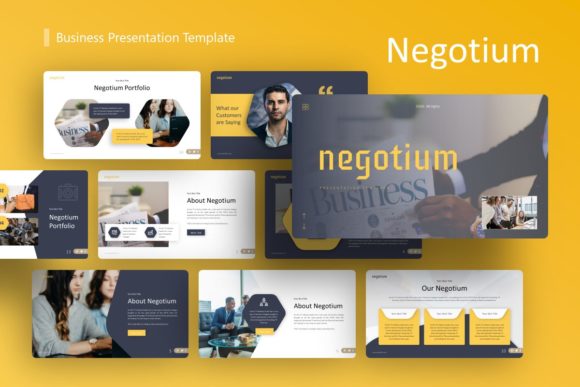
It is equally important to note what is not included. All photography seen in the demo previews is for demonstration purposes only and is not part of the downloadable files. This is standard practice in template distribution due to licensing restrictions, but it requires users to have their own image library ready. Professionals should view this as an opportunity rather than a deficit; using your own authentic photography or licensed stock that matches your specific brand identity will always yield better results than generic placeholder art. Additionally, while the template is highly customizable, it works best when users respect the established grid system. Drastically altering the fundamental layout proportions can sometimes break the visual harmony, so minor adjustments are generally preferable to complete structural overhauls.
Strategic Application for Pitch Decks and Portfolios
When deploying Negotium for investor pitch decks, the 36-slide count provides ample coverage for every necessary component of a fundraising narrative, from problem identification and solution validation to market sizing and team introductions. However, having 36 slides does not mean you should use all of them. The value lies in selection. A strong pitch deck might only utilize 10 to 15 of these slides, chosen specifically to support the unique arc of your business story. The template acts as a menu of professional options, allowing founders to assemble a bespoke deck without designing each slide from scratch.
For personal portfolios and creative showcases, the application shifts toward curation. The template’s clean typography and balanced whitespace allow work samples to breathe. In this context, the "Company Profile" slides can be repurposed as "About Me" sections, and "Service Offering" layouts can display pricing packages or skill sets. The key to success in these scenarios is restraint. Let the template provide the structure, but ensure your personality and unique value proposition drive the content. The goal is for the audience to remember your work and your expertise, with the design serving as an invisible, supportive frame.
Making the Right Choice for Your Needs
While the Negotium Business Presentation Template offers substantial advantages in efficiency and aesthetics, it is helpful to assess fit before adoption. This template is ideal for users who operate within the Microsoft PowerPoint ecosystem and require a balance of corporate professionalism and creative flexibility. It is particularly well-suited for those who lack dedicated design resources but need to produce agency-quality deliverables regularly.
However, users who require complex animation sequences or highly specific, non-standard data visualizations might find that a template provides a starting point rather than a final solution. Similarly, those strictly committed to Keynote or Google Slides should verify compatibility or seek platform-native alternatives to avoid formatting discrepancies. Ultimately, Negotium represents a pragmatic middle ground: it removes the friction of basic design execution, freeing up cognitive bandwidth for strategy, storytelling, and audience engagement. By handling the visual heavy lifting, it allows professionals across the spectrum—from startup founders to freelance photographers—to communicate with greater confidence and impact.