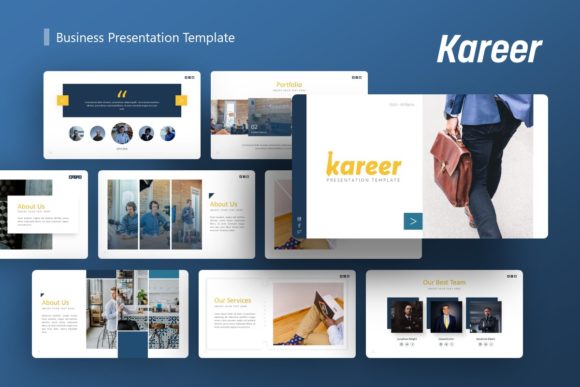
Kareer Business Presentation Template: Elevating Modern Visual Communication
In an era where attention spans are fleeting and visual literacy is at an all-time high, the standard of business communication has shifted dramatically. The days of text-heavy, monochromatic slides that serve merely as teleprompters for speakers are effectively over. Today’s professionals, entrepreneurs, and creatives require tools that bridge the gap between strategic messaging and compelling design. This is precisely where the Kareer Business Presentation Template establishes its relevance. It is not simply a collection of pre-designed slides; it is a comprehensive visual framework designed to meet the diverse needs of modern storytelling, from high-stakes startup pitch decks to nuanced personal portfolios.
The evolution of presentation software has moved beyond basic formatting. Users now expect a level of polish previously reserved for expensive agency work, yet they demand the flexibility to edit content rapidly without breaking design integrity. Kareer addresses this tension by offering a system based on Master Slides, ensuring that global changes can be made efficiently while maintaining pixel-perfect illustrations and layout consistency. For adults navigating the complexities of professional branding—whether as freelancers, corporate leaders, or educators—this template serves as both a time-saver and a quality benchmark.
Versatility Across Professional Landscapes
One of the most significant shifts in the modern workforce is the dissolution of rigid industry silos. A creative agency might need to present financial projections, while a corporate firm might need to showcase internal innovation with the flair of a design studio. The Kareer Business Presentation Template is engineered for this fluidity. Its architecture supports a wide variety of use cases without feeling generic or disjointed.
For Creative Agencies and Portfolios, the template provides a structured canvas to display visual work without the design of the slide competing with the content. The picture placeholders utilize a drag-and-drop functionality that respects aspect ratios and alignment, allowing photographers and designers to swap assets instantly while preserving the intended aesthetic. This is crucial for professionals who must tailor their portfolios for different clients or job applications frequently.
In the realm of Startups and Pitch Decks, clarity is currency. Investors and stakeholders do not have the patience to decipher complex data. Kareer includes handcrafted infographics specifically designed within PowerPoint to translate dense metrics into digestible visual narratives. Because these graphics are fully resizable and editable vectors rather than static images, founders can update growth charts or market sizing data moments before a meeting without needing external graphic design software. This agility is essential in fast-moving business environments where data evolves daily.
Similarly, for Corporate and Business Profiles, the template offers a refined tone that communicates stability and professionalism. The 36 unique slides provide enough variation to cover organizational history, team introductions, service offerings, and future roadmaps without repetition. This depth allows large organizations to maintain brand consistency across different departments, ensuring that a marketing presentation feels cohesive with a quarterly financial review.
The Technical Advantage of Master Slide Architecture
Understanding why Kareer performs better than ad-hoc slide creation requires looking under the hood at its technical foundation. Many users struggle with presentation templates because they are built as individual, disconnected slides. Changing a font or color scheme in those files often requires editing dozens of slides manually, a process prone to error and inconsistency. Kareer is built on Master Slides, a feature that fundamentally changes the workflow.
By anchoring design elements to the master layer, users can implement global branding updates in seconds. If a company rebrands or a freelancer wants to test a new color palette for a specific client, the change propagates throughout the entire deck automatically. This technical approach aligns with modern efficiency standards, reducing the administrative burden of design maintenance. Furthermore, the inclusion of vector icons ensures that visuals remain crisp on any display, from laptop screens to large-format conference projectors. Rasterized icons often appear pixelated when resized, undermining the perceived professionalism of a presentation; Kareer’s vector-based assets eliminate this risk entirely.
The "easy customizable contents" promise is realized through intelligent layout design. Text boxes are sized and positioned to accommodate varying amounts of content without breaking the grid. This is particularly important for non-designers who may not have an intuitive sense of whitespace and hierarchy. The template acts as a guardrail, keeping content organized and visually balanced even when the user modifies the copy significantly.
Adapting to Changing User Expectations and Workflows
The way we consume information has changed, and so have the expectations placed on presenters. Audiences today are accustomed to the high production values of digital media. They expect presentations to be visually engaging, logically structured, and aesthetically pleasing. A poorly designed deck can inadvertently signal a lack of attention to detail or outdated practices, regardless of the quality of the underlying ideas.
Kareer responds to this shift by prioritizing pixel-perfect illustrations and contemporary typography. However, it balances aesthetics with practical utility. The recognition that "all images on the demo are just for preview purpose only and not actually included" is a transparency that respects the user's need for authentic content. It encourages creators to populate the template with their own genuine photography and data, rather than relying on stock imagery that can make a presentation feel impersonal or manufactured.
This focus on authenticity extends to the Personal Portfolio application. As the gig economy expands and career paths become less linear, individuals increasingly need to market themselves as brands. A resume is no longer sufficient; professionals need dynamic documents that tell a story of their capabilities and achievements. Kareer provides the structure for this narrative, allowing individuals to present case studies, testimonials, and skill sets in a format that stands out in a crowded marketplace.
Practical Implementation and File Management
Adopting a new template system should reduce friction, not create it. The Kareer Business Presentation Template is delivered with a focus on immediate usability. The primary deliverable is a PowerPoint .PPTX file, ensuring compatibility with the most widely used presentation software in the business world. This universality is key for collaboration; teams can share and edit files without worrying about format conversion issues or missing fonts.
To support users in maximizing the template’s potential, a comprehensive Documentation File is included. This resource is invaluable for those who may be less familiar with advanced PowerPoint features like master slide editing or vector manipulation. It bridges the knowledge gap, empowering users to take full ownership of the design rather than feeling limited by their technical skills. Additionally, the inclusion of a dedicated Vector Icon set means users have immediate access to a library of consistent visual symbols, removing the need to source mismatched icons from disparate websites.
When implementing Kareer, consider the following practical recommendations to ensure the best results:
- Audit Your Content First: Before opening the template, outline your narrative. With 36 slides available, it is tempting to use more than necessary. Select only the layouts that serve your specific story to maintain audience engagement.
- Leverage the Drag-and-Drop Placeholders: Do not paste images directly onto slides. Always use the designated picture placeholders to ensure automatic cropping and alignment. This preserves the professional look of the template.
- Customize the Infographics: Use the handcrafted infographics as a starting point but adapt them to your actual data. Authentic data visualization builds trust, whereas generic placeholder charts can detract from your credibility.
- Maintain Visual Hierarchy: When editing text, respect the original font sizing and weight distinctions. These were chosen to guide the viewer’s eye through the content logically. Drastic changes to typography can disrupt the reading flow.
- Export for Compatibility: While the .PPTX file is editable, always save a PDF backup before presenting. This ensures that your formatting remains intact regardless of the device or software version used at the venue.
The Strategic Value of Consistent Visual Identity
Ultimately, the choice of a presentation template like Kareer is a strategic decision about brand perception. In a competitive landscape, consistency breeds recognition and trust. Whether you are a startup seeking seed funding, a photographer showcasing a new collection, or a corporation reporting to shareholders, the visual container of your message matters as much as the message itself.
The template’s ability to serve multiple purposes—from creative portfolios to corporate profiles—reflects the reality of modern professional life where roles are multifaceted. By providing a robust, editable, and aesthetically sophisticated foundation, Kareer allows professionals to focus on what they do best: developing ideas, capturing images, and building businesses. It removes the barrier of design anxiety and replaces it with a toolset that empowers clear, confident communication.
As workflows continue to evolve and the demand for high-quality visual content grows, having a reliable, versatile presentation asset is no longer a luxury—it is a necessity. Kareer Business Presentation Template offers that reliability, combining technical excellence with creative flexibility to help users navigate the complexities of modern visual storytelling with ease and impact. By investing in such a tool, professionals are not just buying slides; they are securing a scalable solution for their ongoing communication needs.